
How I turned manual validation steps and Python scripts into a self-service Streamlit app.
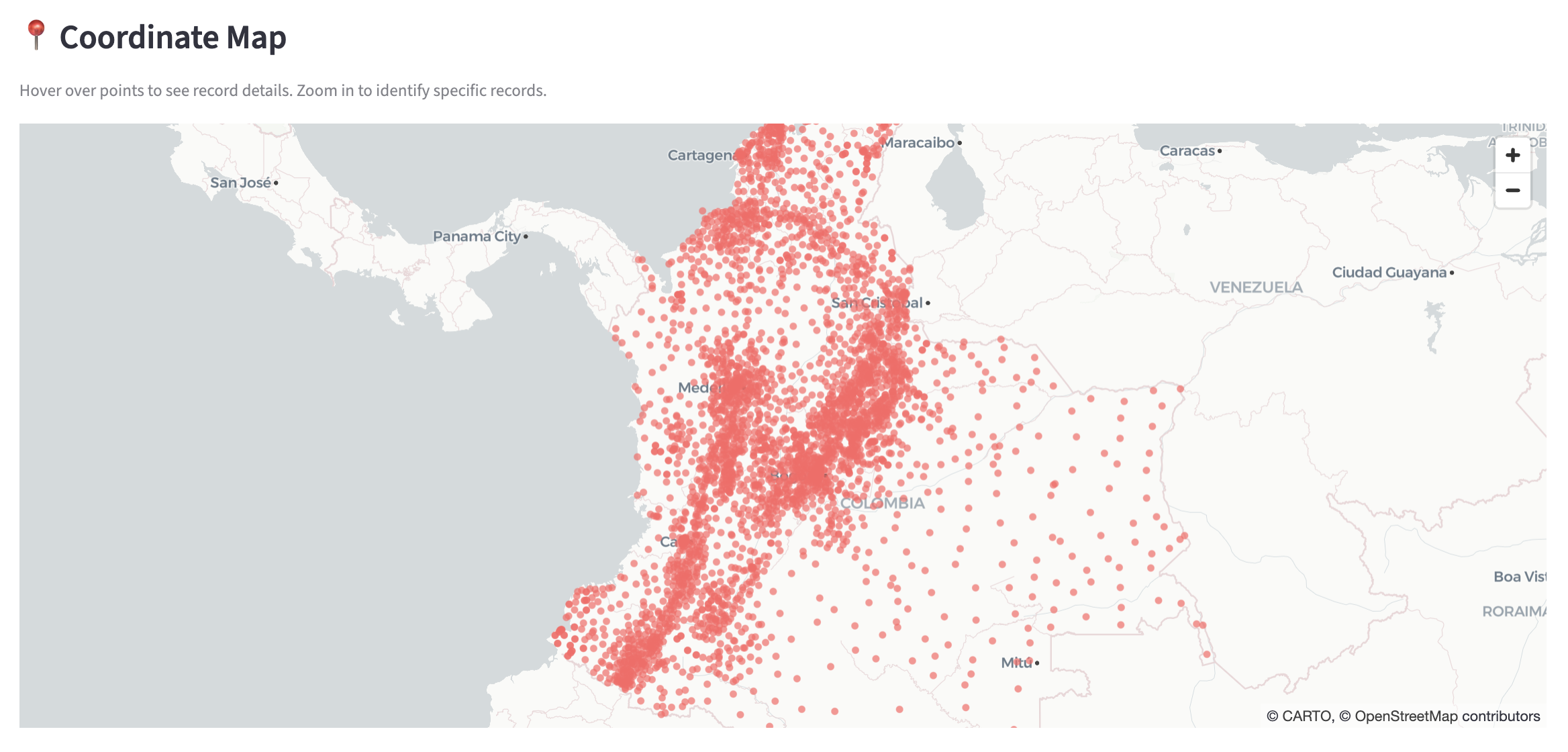 Streamlit Coordinate Map Viz
Background
Over the past few weeks, I’ve been building LocDB Tools—a Streamlit app that consolidates and automates several workflows my team members perform on a weekly basis. This post covers two of the three main tools:
- LocDB Update Validator — validates bulk SQL files before they hit the database
- SQL Generator — generates insert/edit/delete SQL statements from CSV uploads
The third tool (AI-powered regression report analysis) is covered in a separate post.
SQL Validator: Catching Data Issues Before They Deploy
The problem:
Our location database is used by many downstream teams that rely on and expect a high standard of data accuracy.
We’re human though - mistakes happen, especially when we make large changes to the database.
To help catch and prevent issues, I created a number of SQL quality triggers that identify issues during writes:
- duplicate locations
- invalid coordinates
- orphaned aliases
- broken/invalid geographic admin references
The triggers work, but few people on the team were using them.
Why? Because testing your data against the triggers required:
- Downloading a large database dump
- Setting up a local instance of MySQL (tricky)
- Manually applying 4 trigger SQL files
- Running your update script and watching for errors
The solution:
Reduce user friction.
Implement the same checks using Python in a self-service Streamlit app.
To do this I used Python to implement the same validation logic, running against a read-only connection to the prod instance of the DB. No local setup. Just upload your SQL file and get a report back of what might need a second look.
The validator catches:
- Lat/Lon out of range — coordinates outside valid bounds (dangerous to downstream services that could break otherwise)
- Invalid admin references — country/admin1/admin2/etc that don’t match existing parent records (bad for a host of reasons)
- Duplicates — both within the upload AND against existing prod data (mnessy data)
- Orphaned aliases — parent_id references pointing to nothing (more messy data)
def validate_admin_references(record: dict, db: LocDB) -> list[str]:
    errors = []

    if record['country']:
        country_exists = db.query_locb(
            f"SELECT 1 FROM location_table WHERE country='{record['country']}' AND type='COUNTRY'"
        )
        if country_exists.empty:
            errors.append(f"Country '{record['country']}' not found in LocDB")

    # Check admin1 references country...
    # (and so on down the hierarchy)

    return errors
The validator also includes an interactive map visualization.
Interactive map showing coordinate validation
This makes it easy to spot bad coords that might otherwise go unnoticed and allows for spot checking.
SQL Generator
The second tool generates SQL files for bulk operations. Previously, analysts had to:
- Download Python scripts
- Modify file paths in the script
- Run locally to generate SQL
- For edits: manually create a separate history CSV
Now they upload a single CSV and click a button.
The edit operation is particularly nice because it queries the database for current values and auto-generates the history file detailing what changed.
def generate_edit_sql(df, columns_to_update, ldap) -> tuple:
    # Fetch current values from prod
    current_df = fetch_current_values(df['id'].tolist())

    for _, row in df.iterrows():
        current = current_lookup[row['id']]

        # Generate UPDATE for edit table
        # Generate INSERT for history table (only for changed columns)
        # Generate rollback scripts for both
Each operation produces rollback scripts - just in case, but hopefully with the new tooling above we never need them.
Results
Time Savings
| Task | Before | After |
|---|---|---|
| Bulk edit / history file creation | 30-60 min | 5 seconds |
| Trigger validation testing | 30+ min setup | 5 seconds |
Quality Gates
The biggest win is codifying validation that was previously a long manual checking process.
- Duplicate detection catches issues before they hit prod
- Admin reference validation prevents orphaned location hierarchies
- Lat/lon checks catch the occasional source data errors that could impact downstream services
Learnings: Reduce Friction
These checks existed but were prone to human-error. Now they’re enforced automatically - and I learned that reducing friction is really the most effective way to get people to adopt new processes.
If you can show you’re making their life easier, they’re much more likely to adopt the new method.
What’s Next
In the next post, I cover integrating AI-powered regression report analysis into the app — and the engineering challenges that came with it.